Finance AI Data Manager

Finance AI Data Manager

Redesigned the data manager for a conversatinal financial analysis AI to enable easy organize and navigate files.

Redesigned the data manager for a conversatinal financial analysis AI to enable easy organize and navigate files.

AI

AI

Usability

Usability

Desktop

Desktop

B2B

B2B

Timeline

Timeline

6/2024 - 8/2024

6/2024 - 8/2024

8 weeks

8 weeks

Mentor

Mentor

1 Design Lead

1 Design Lead

2 Designers

2 Designers

My Role

My Role

UX Design Intern

UX Design Intern

@ Vianai Systems

@ Vianai Systems

Summary

Summary

Goal

Goal

Solve clients' usability issues in organizing and navigating massiave amount of files.

Solve clients' usability issues in organizing and navigating massiave amount of files.

What did I do

What did I do

Define the product scope and discover users' needs

Define the product scope and discover users' needs

  • Led 2 client feedback sessions

  • Drafted 3 interview and 2 questionnaire scripts.

  • Led 2 client feedback sessions

  • Identify 6 usability issues

  • Identify 6 usability issues

Design the product

Design the product

  • Solely redesigned the product

  • Solely redesigned the product

Outcomes

Outcomes

  • Data manager usage rate increase from 54% to 72%

  • Data manager usage rate increase from 54% to 72%

  • Data manager usage rate increase from 54% to 72%

Reducing uncertainty in dog health through real-time tracking, condition analysis, and AI diagnosis.

Data Visualization

Healthcare

Mobile

User Research

Timeline

6/2025 - 9/2025

12 weeks

Collaboration

1 Product Manager

1 Engineer

My Role

Product Designer

UX Design Intern

UX Designer Intern

UX Product Intern

@ CayKnight.AI

@ Vianai Systems

@ Vianai Systems

Problem Discovery

Clients have difficulties organizing massive amount of files

Clients have difficulties organizing massive amount of files

Context - Clients upload massive amount of files to support anti-hallucination

Context - Clients upload massive amount of files to support anti-hallucination

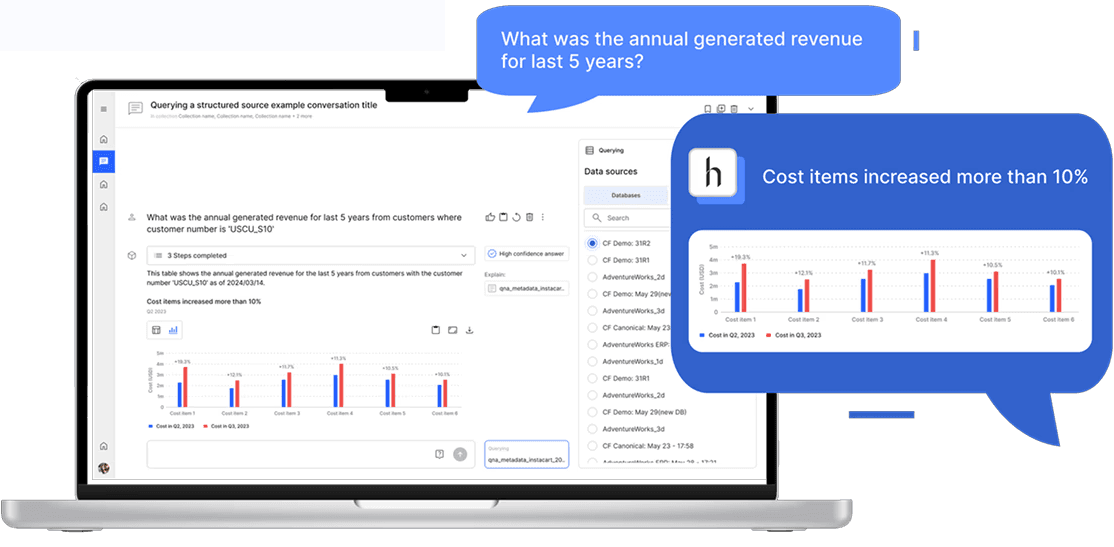
hila Enterprise is a conversational AI designed for financial data analysis. Its core strength is minimizing hallucinations to ensure accurate, trustworthy results.


To achieve this, users are required to query files when asking questions. The AI then analyzes the queried files and presents insights through structured outputs such as tables and charts. As a result, users often need to upload large volumes of files.

hila Enterprise is a conversational AI designed for financial data analysis. Its core strength is minimizing hallucinations to ensure accurate, trustworthy results.


To achieve this, users are required to query files when asking questions. The AI then analyzes the queried files and presents insights through structured outputs such as tables and charts. As a result, users often need to upload large volumes of files.

hila Enterprise is a conversational AI designed for financial data analysis. Its core strength is minimizing hallucinations to ensure accurate, trustworthy results.


To achieve this, users are required to query files when asking questions. The AI then analyzes the queried files and presents insights through structured outputs such as tables and charts. As a result, users often need to upload large volumes of files.

In the beginning, only 54% of users use data manager, and received feedbacks from clients reporting issues on the data manager.


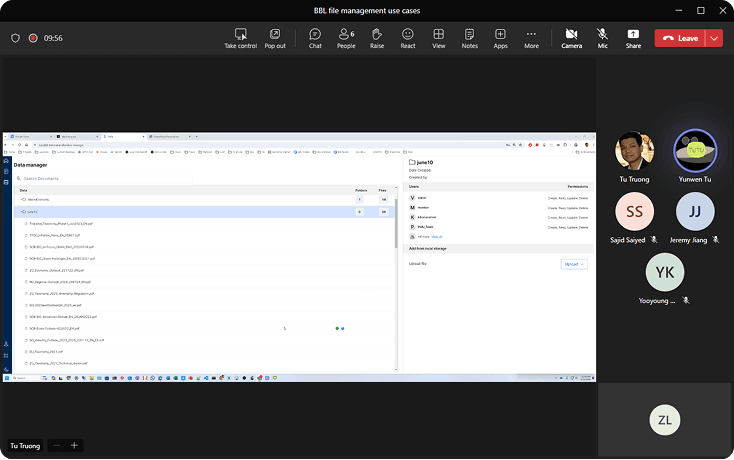
To better understand how to improve, I led two client feedback sessions and conducted a usability testing to learn the issues with the current data manager.

In the beginning, only 54% of users use data manager, and received feedbacks from clients reporting issues on the data manager.


To better understand how to improve, I led two client feedback sessions and conducted a usability testing to learn the issues with the current data manager.

In the beginning, only 54% of users use data manager, and received feedbacks from clients reporting issues on the data manager.


To better understand how to improve, I led two client feedback sessions and conducted a usability testing to learn the issues with the current data manager.

Client feedback sessions

Usability testing

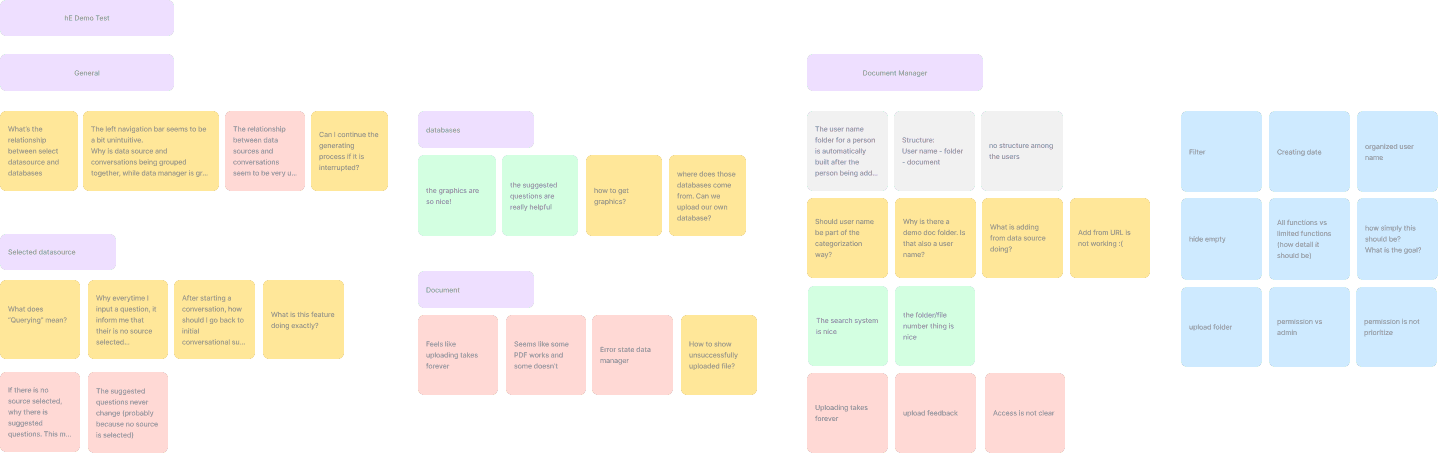
With the clients' feedback sessions and the usability testing, I identified the pain points and the design goals:

With the clients' feedback sessions and the usability testing, I identified the pain points and the design goals:

Pain point

Pain point

Hard to organize massive amount of files.

Hard for users to organize massive amount of files.

Design question

Design question

How might we enable users to easily upload, organize, and navigate massive amount of files.
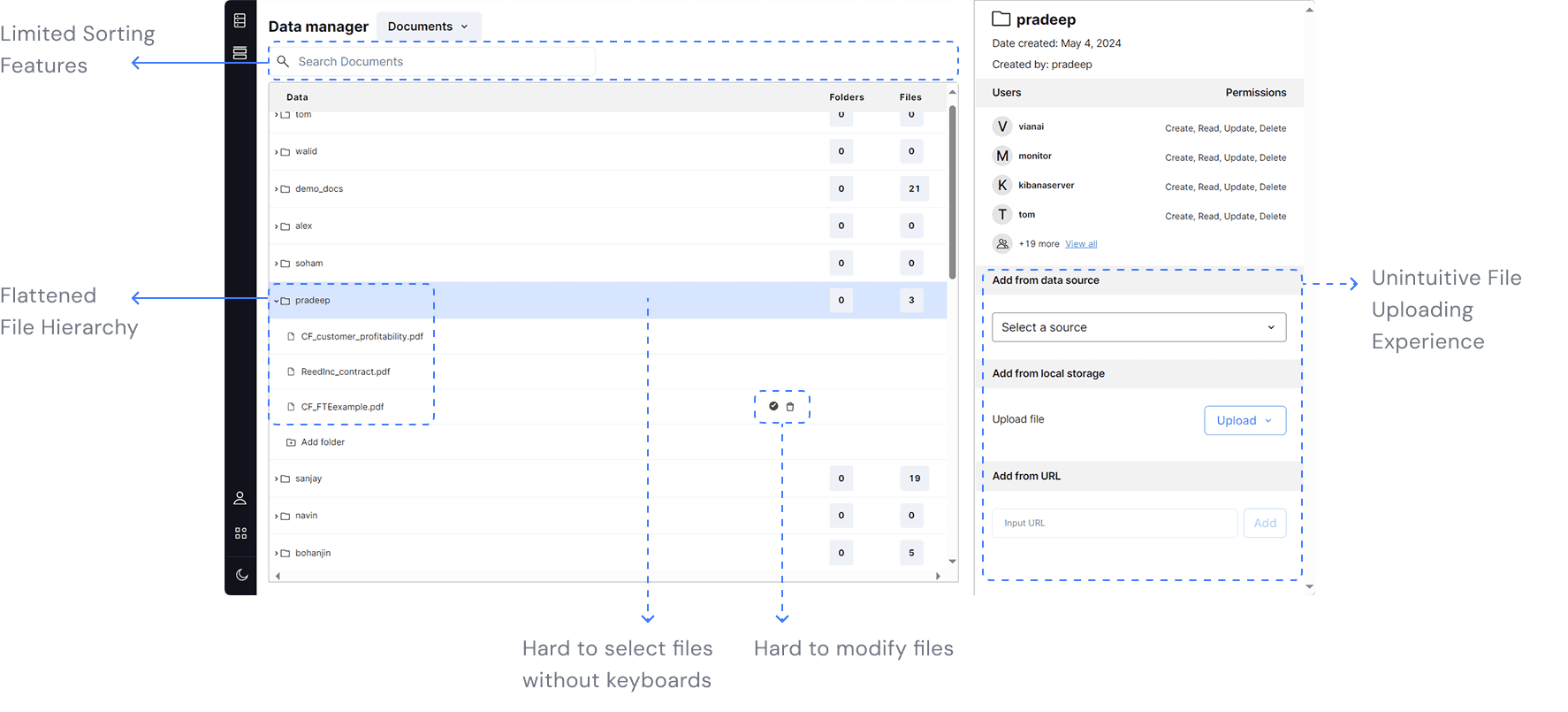
I further identified 6 detailed issues and solved them by design.

I further identified 6 detailed issues and solved them by design.

Design process overview

With those issues in mind, I go through 2 brainstorm sessions, map out some crucial user flows, and went through 3 design iterations to land the final design outcome.
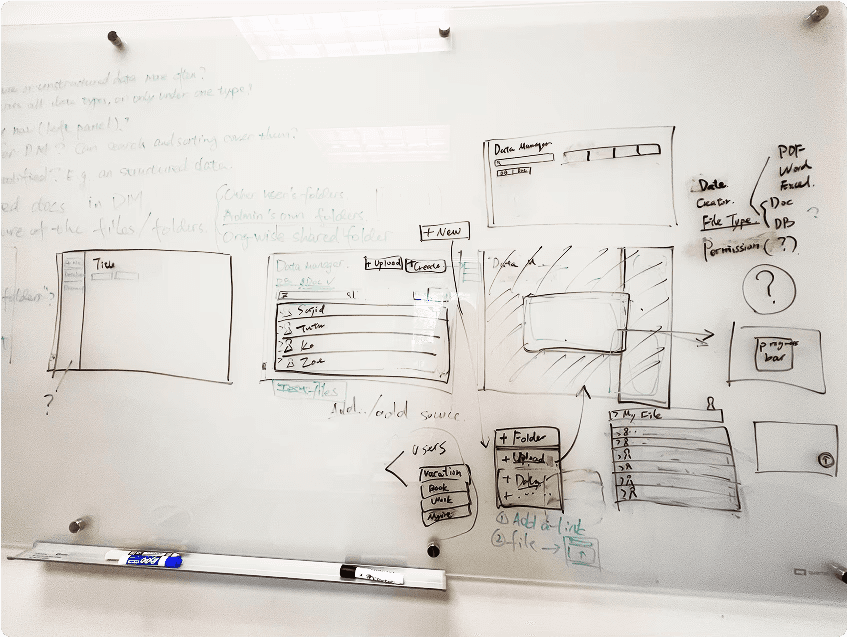
Whiteboard brainstorm session
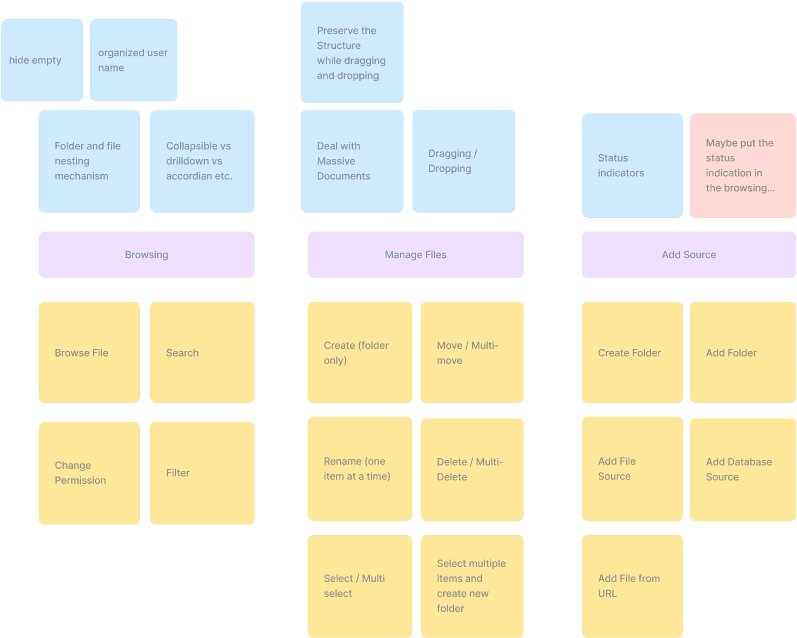
Figjam brainstorm session
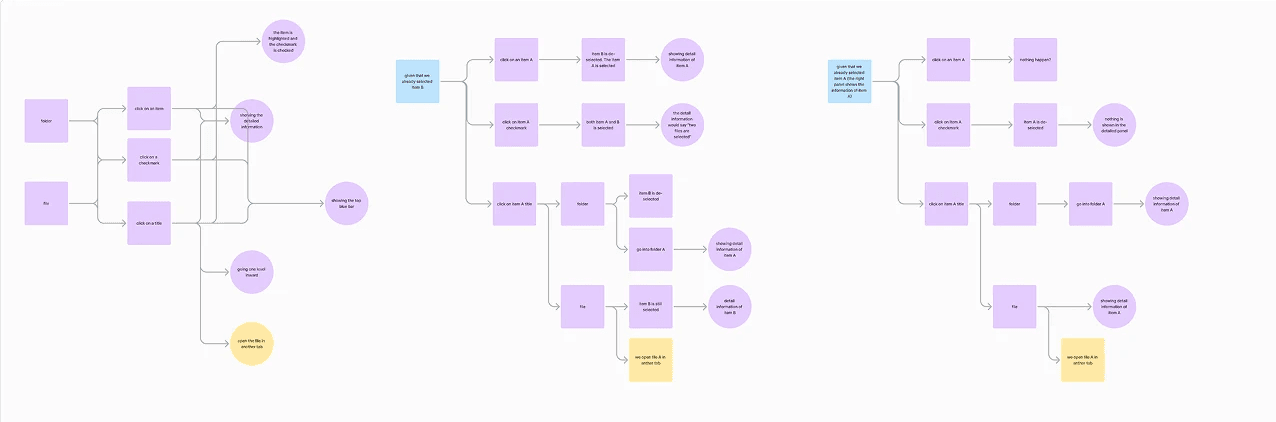
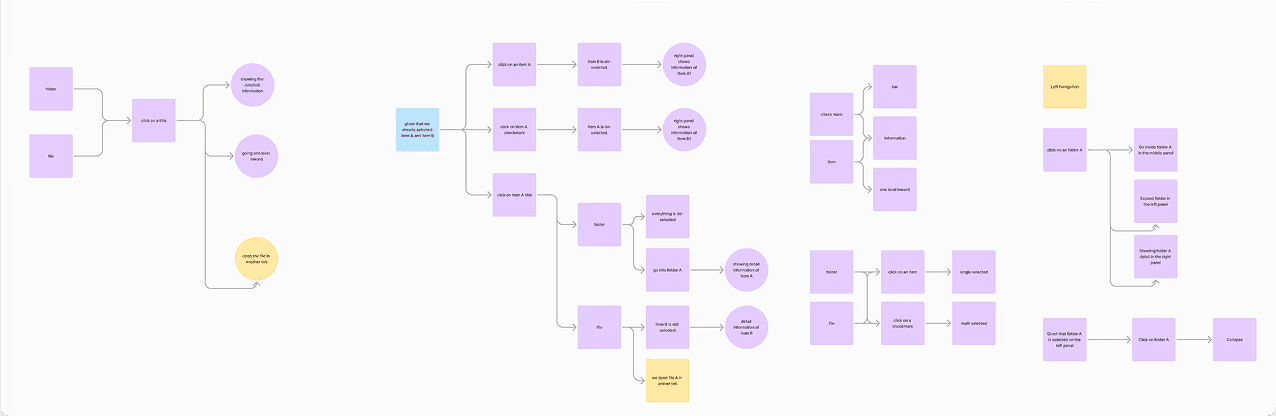
User flow

Low-fi prototype

Mid-fi prototype

Hi-fi prototype

Low-fi prototype

Mid-fi prototype

Mid-fi prototype

Hi-fi prototype

Hi-fi prototype

Solution 1

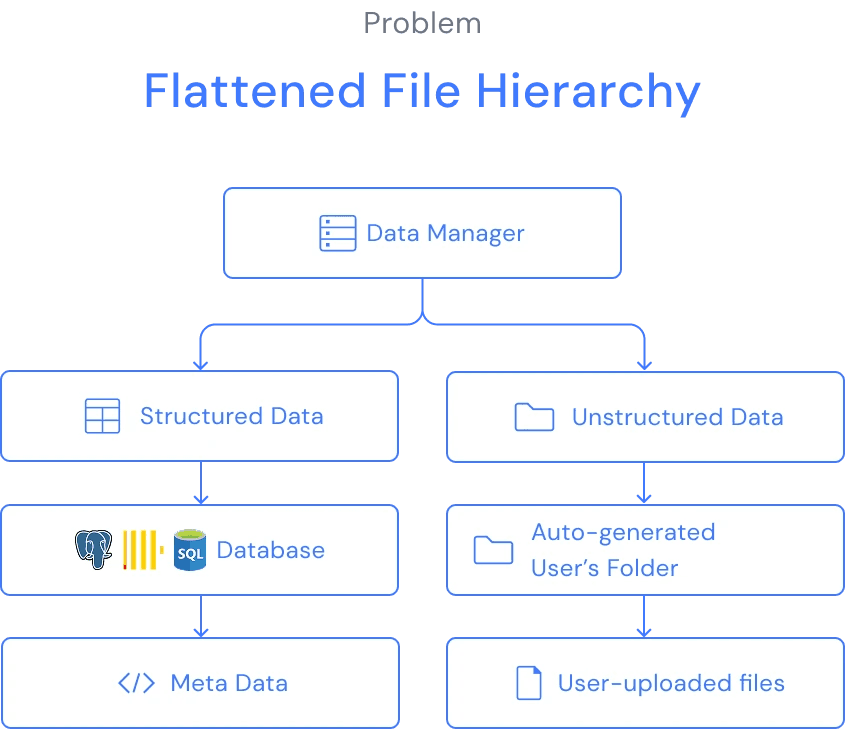
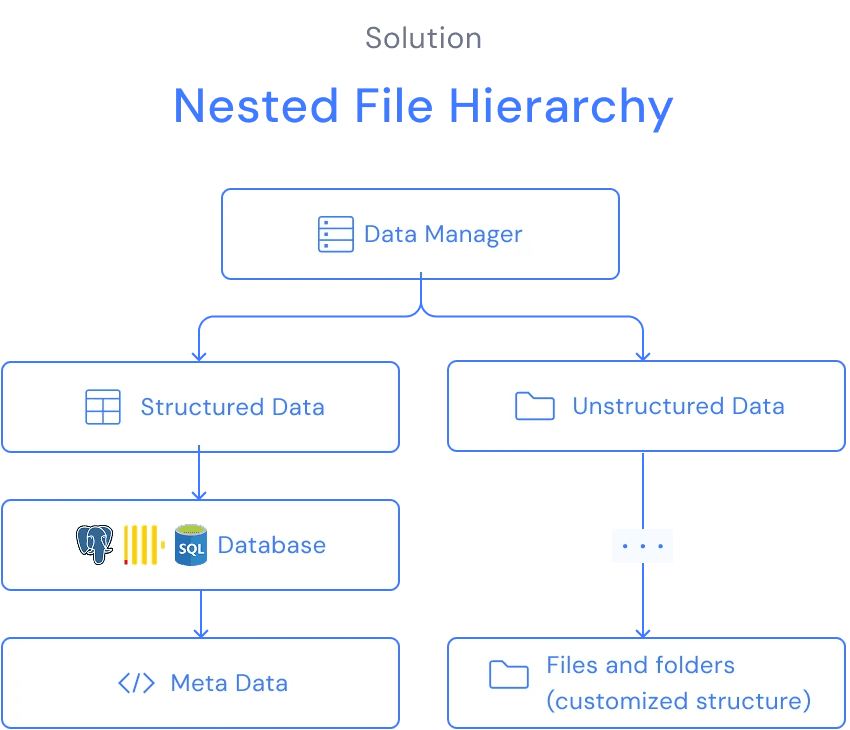
Flattened File Hierarchy → Nested File Hierarchy
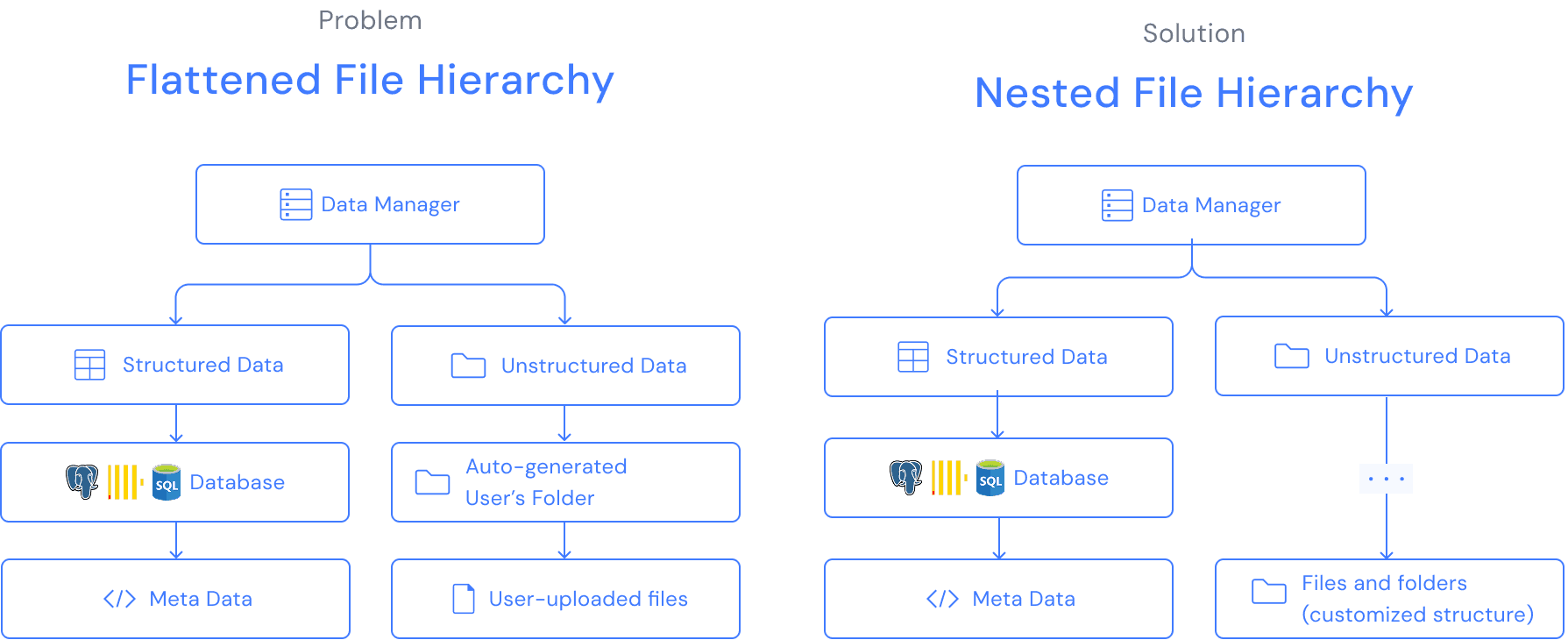
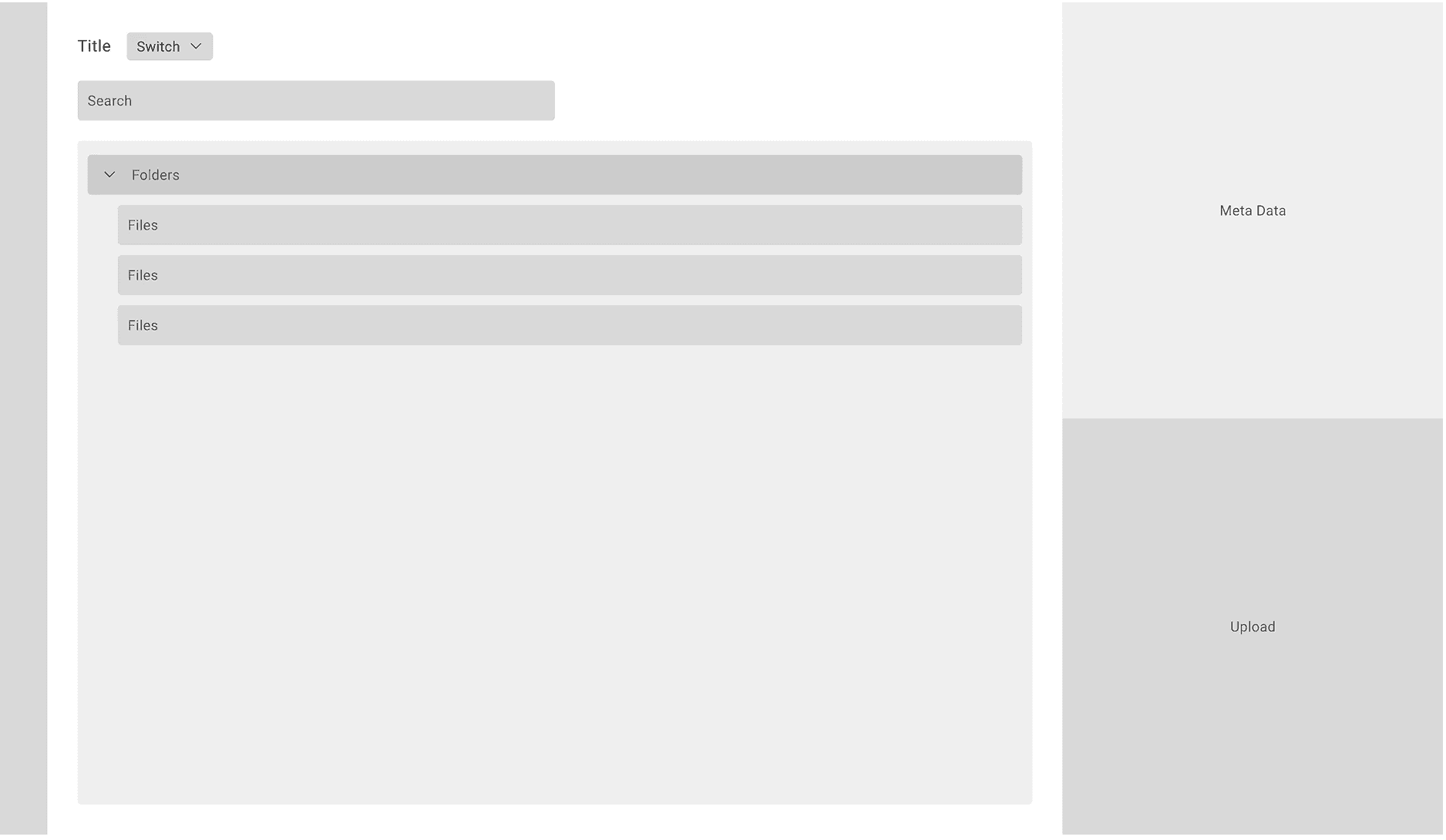
  • Unstructured files has a flat, auto-generated hierarchy.

  • All uploaded unstructured files were grouped only by user folders, making it impossible to organize, browse, or manage large volumes of documents.

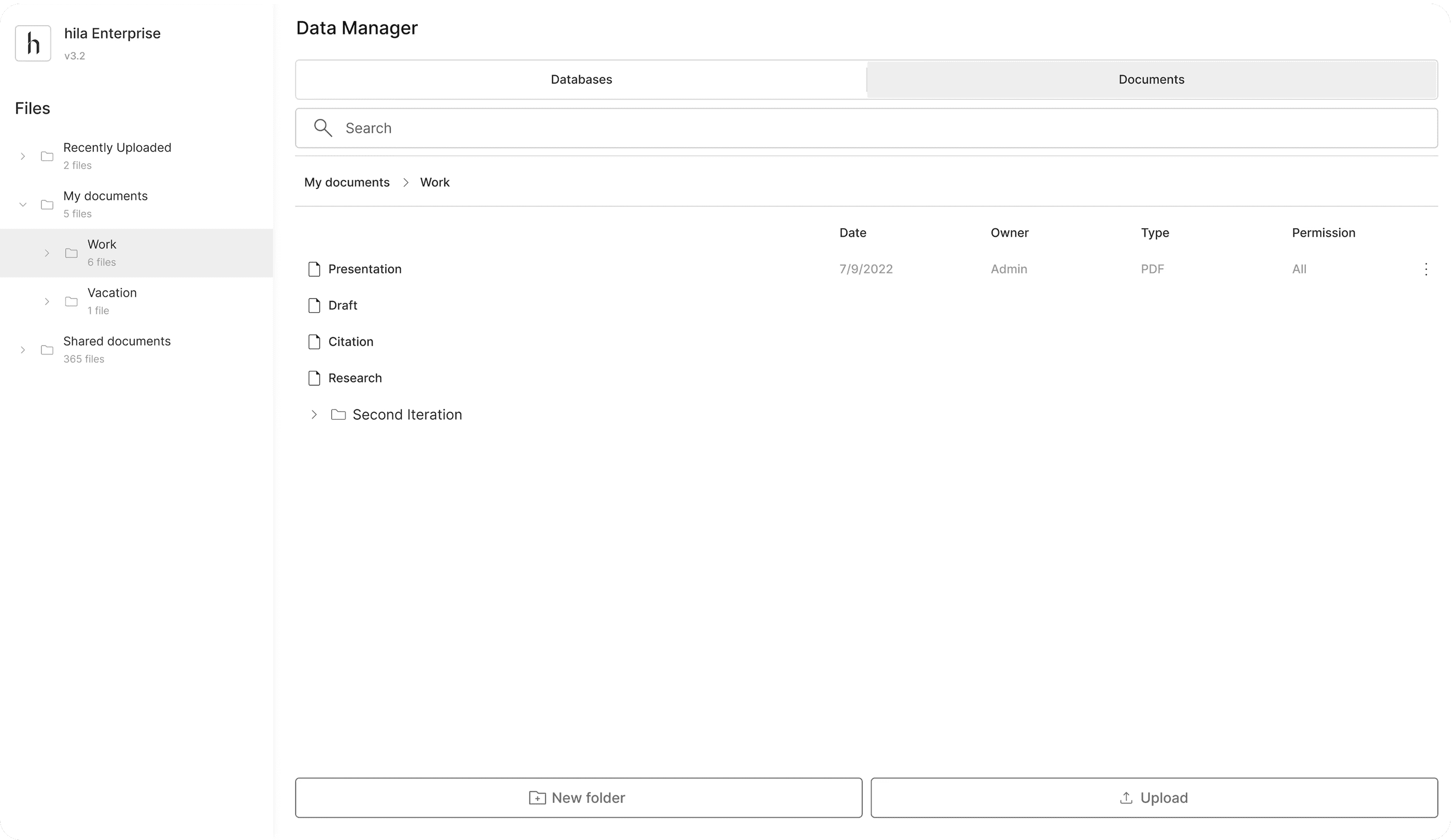
  • A nested, folder-based system for unstructured data.

  • Users can create folders and organize their files, making large file collections easier to navigate and manage.

  • Structured datais unchanged due to technical limitations.

  • Unstructured files has a flat, auto-generated hierarchy.

  • All uploaded unstructured files were grouped only by user folders, making it impossible to organize, browse, or manage large volumes of documents.

  • A nested, folder-based system for unstructured data.

  • Users can create folders and organize their files, making large file collections easier to navigate and manage.

  • Structured datais unchanged due to technical limitations.

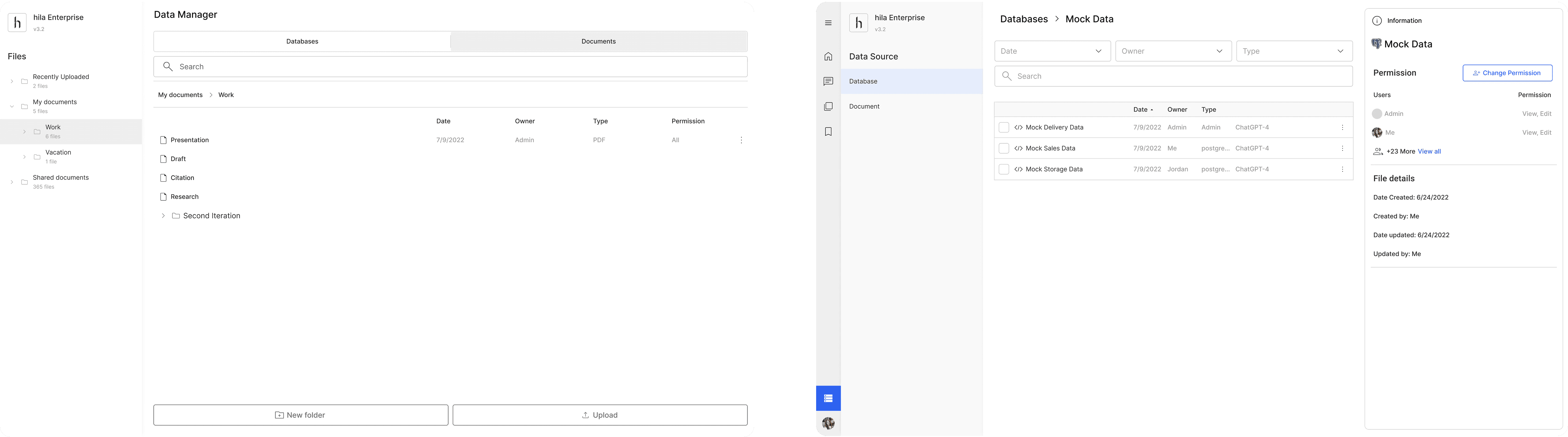
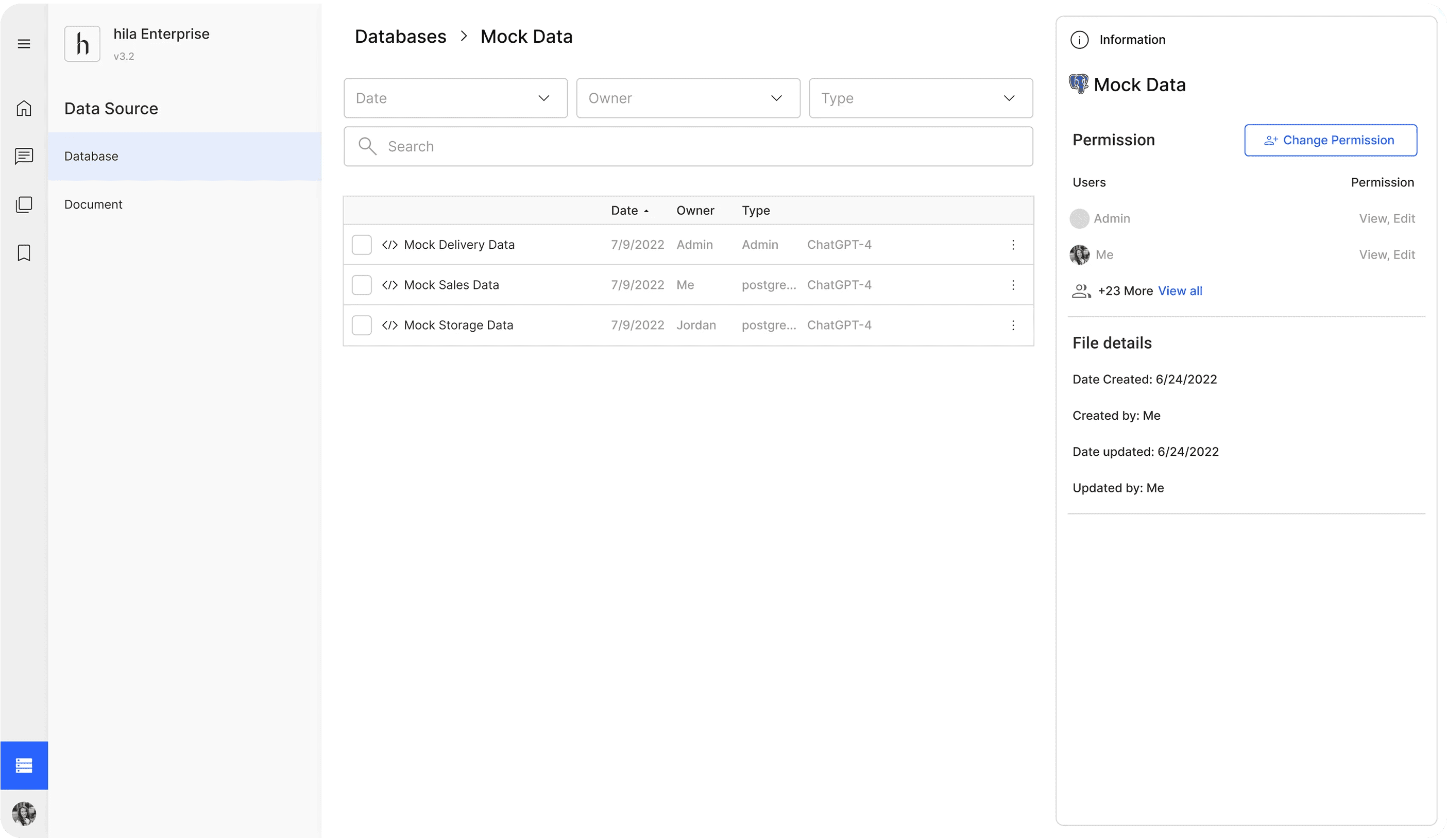
Before: All the files shown in the middle panel.
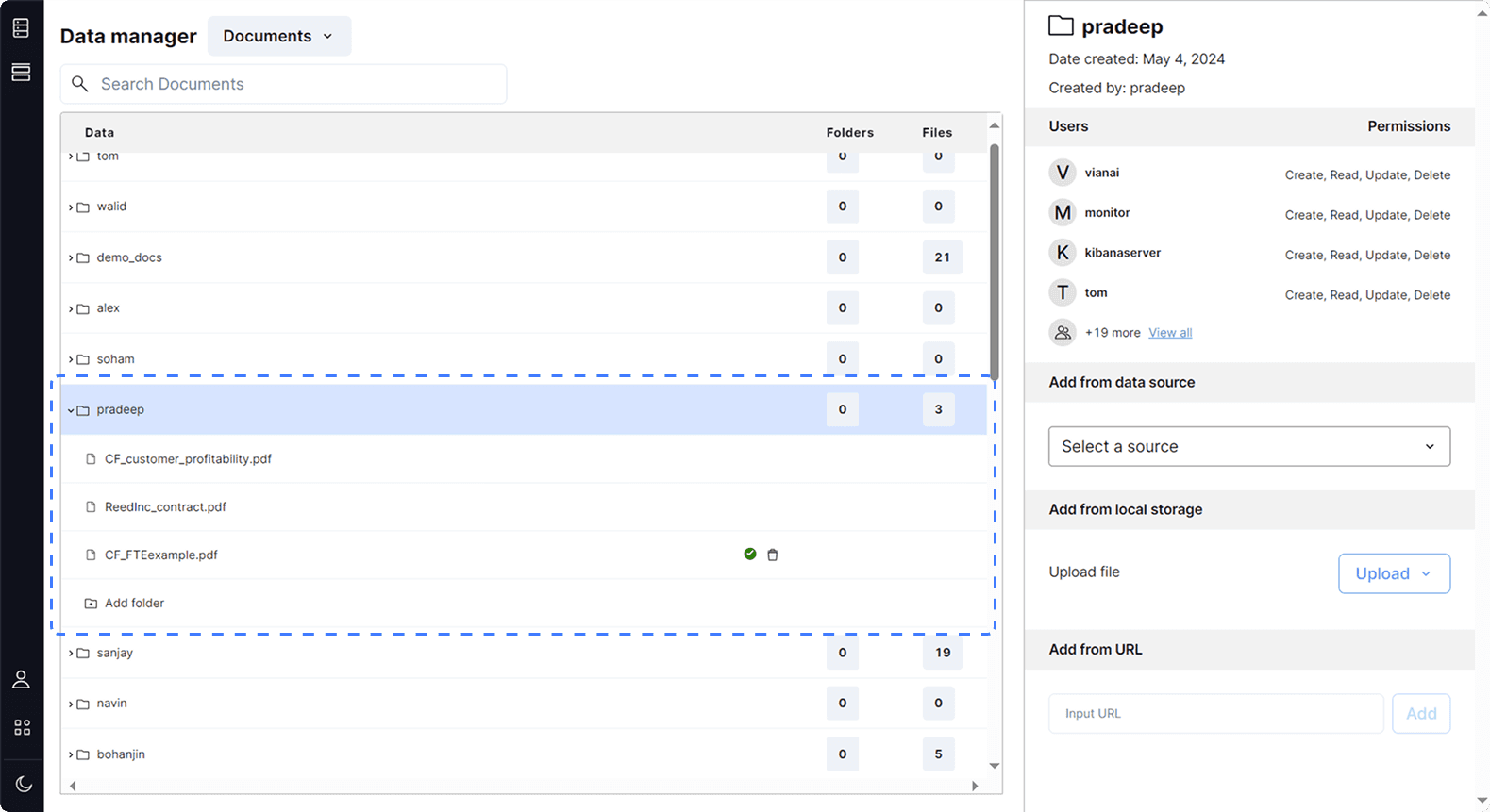
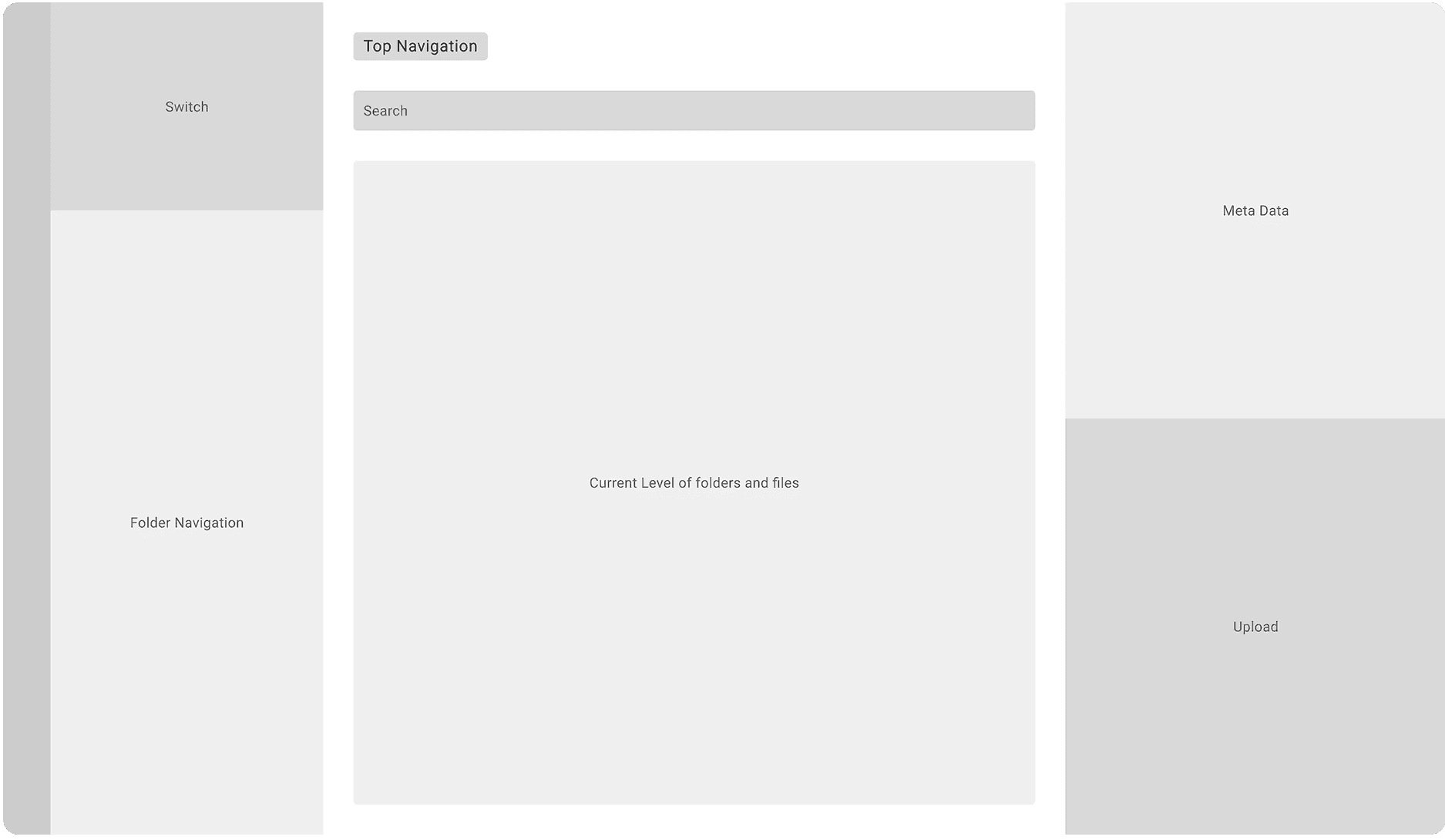
  • Users canswitch between structured and unstructured data from the left panel.

  • Since unstructured data now have a more complex hierarchy, a folder navigation system is added to the left panel, allowing users to see the folder structure and open folders.

After: Left panel for navigation

  • Users can navigate using the top navigation bar. It shows the folder path and its subfolders.

  • Middle panel shows current level

  • Another way to enter a folder is by clicking on its name in the list view.

After: Middle panel for showing current level

  • Users can navigate using the top navigation bar. It shows the folder path and its subfolders.

  • Middle panel shows current level

  • Another way to enter a folder is by clicking on its name in the list view.

After: Right panel for showing meta data

  • The right panel provides a preview of the selected file or folder.

  • If select a meta data, users can preview the content of the meta data to get a brief idea of what's it about.

Solution 2

Difficulty in Modifying Files → Allow Modifying Files on the Right Panel and on Hover

Before: Limited Modifying features
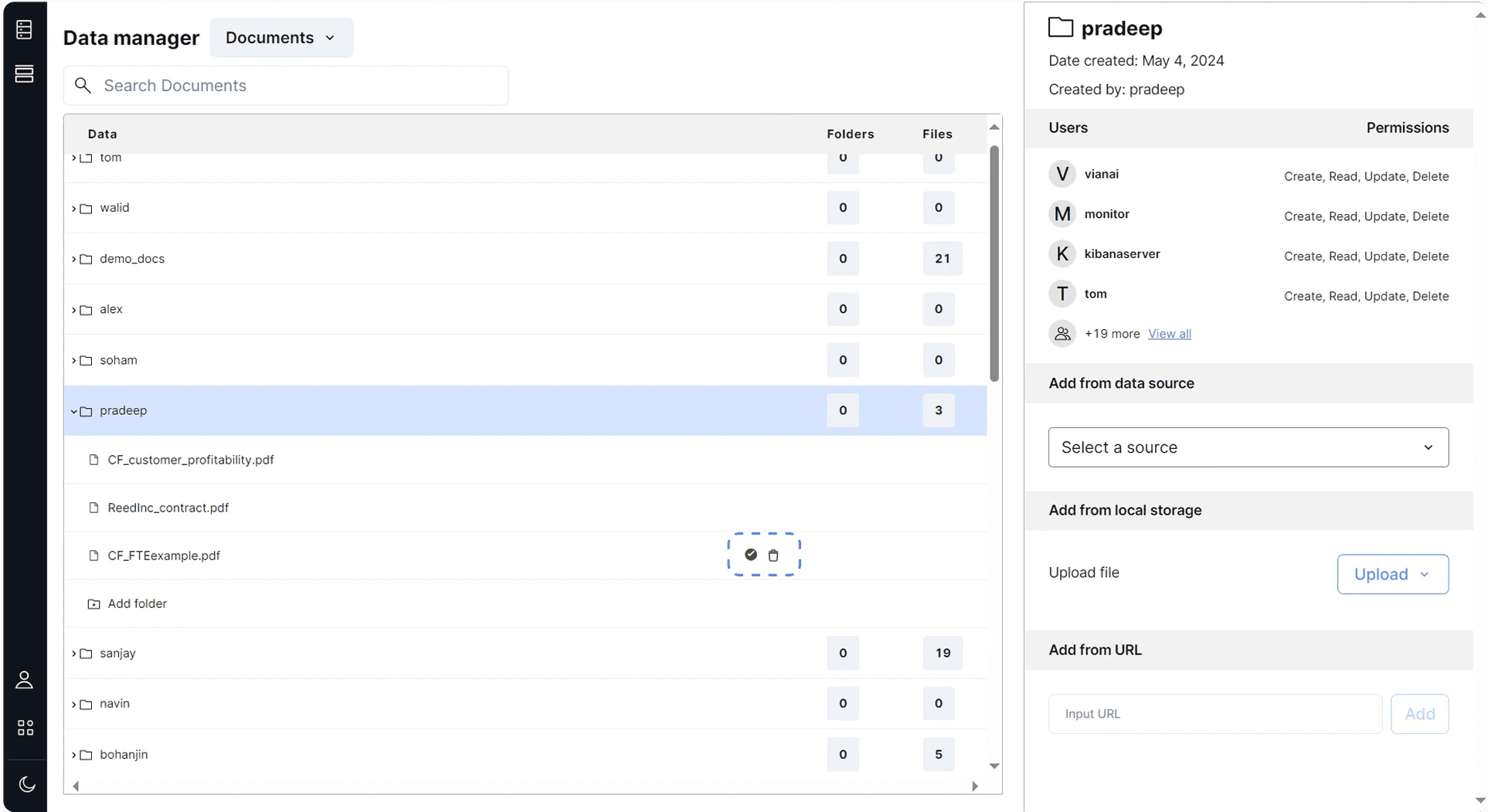
Users could only edit a file when hovering over it, and the only available action was deleting the file.

Users could only edit a file when hovering over it, and the only available action was deleting the file.

To address users’ need for more flexibly editing a file, the new Data Manager introduces multiple ways to modify files, including actions available in the right panel, on hover, and through the top toolbar.

To address users’ need for more flexibly editing a file, the new Data Manager introduces multiple ways to modify files, including actions available in the right panel, on hover, and through the top toolbar.

After: Motify through right panel

After: Motify through right panel

  • Manage sharing permissions.

  • Switch the file’s language model.

After: Motify through hover actions

  • Hover also reveals a More Actions menu that contains all additional file operations.

  • Hover reveals quick-access icons for Change Permission and Delete, the two most common used features.

After: Motify through the top toolbar

  • Top toolbar supports bulk editing.

  • Users can change permissions, move, or delete multiple files at once.

  • Users can change permissions, move, or delete multiple files.

  • Model switching and renaming remain limited to single files.

  • Top toolbar supports bulk editing.

  • Users can change permissions, move, or delete multiple files at once.

  • Model switching and renaming remain limited to single files.

Solution 3

Limited Sorting Features → Enable Searching in Range; Enable Sorting by Date, Owner, and Type

Before: limited sorting and filtering capabilities
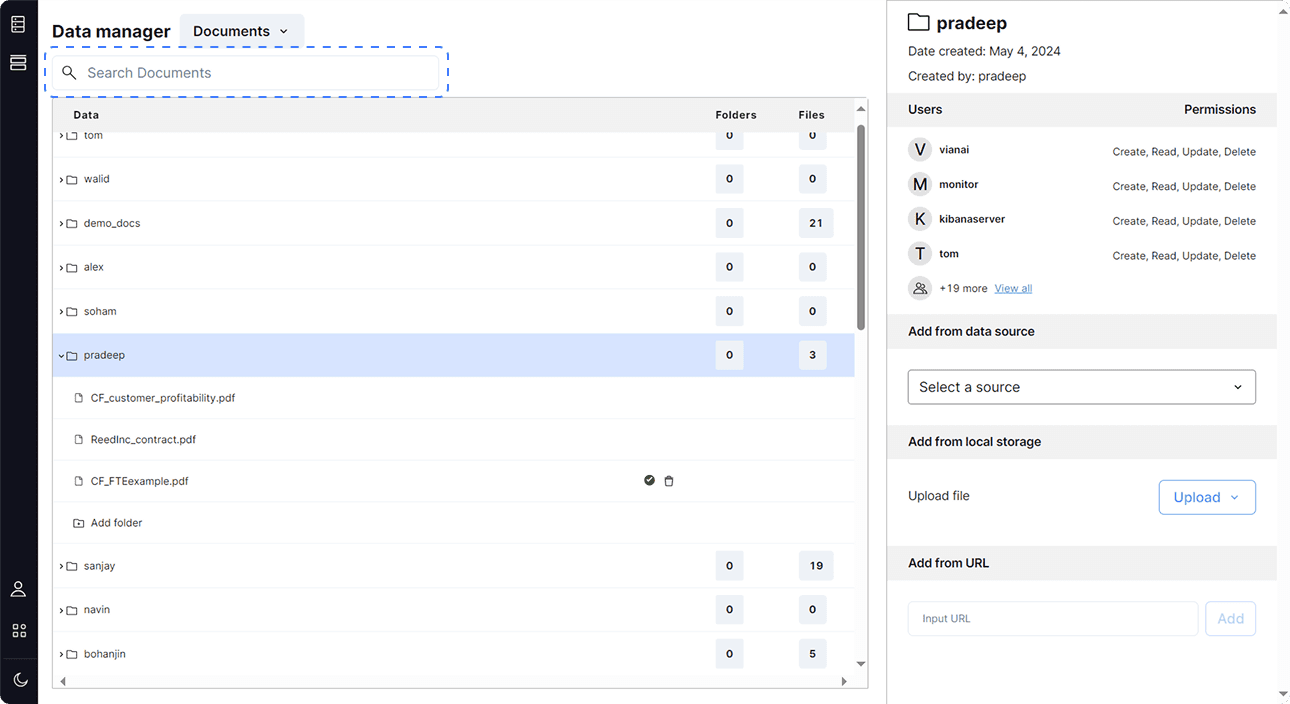
  • No options for sorting or filtering.

  • Can't control the search scope.

  • Difficult to locate files within a large and complex data structure.

After: Filter by date, owner, and type
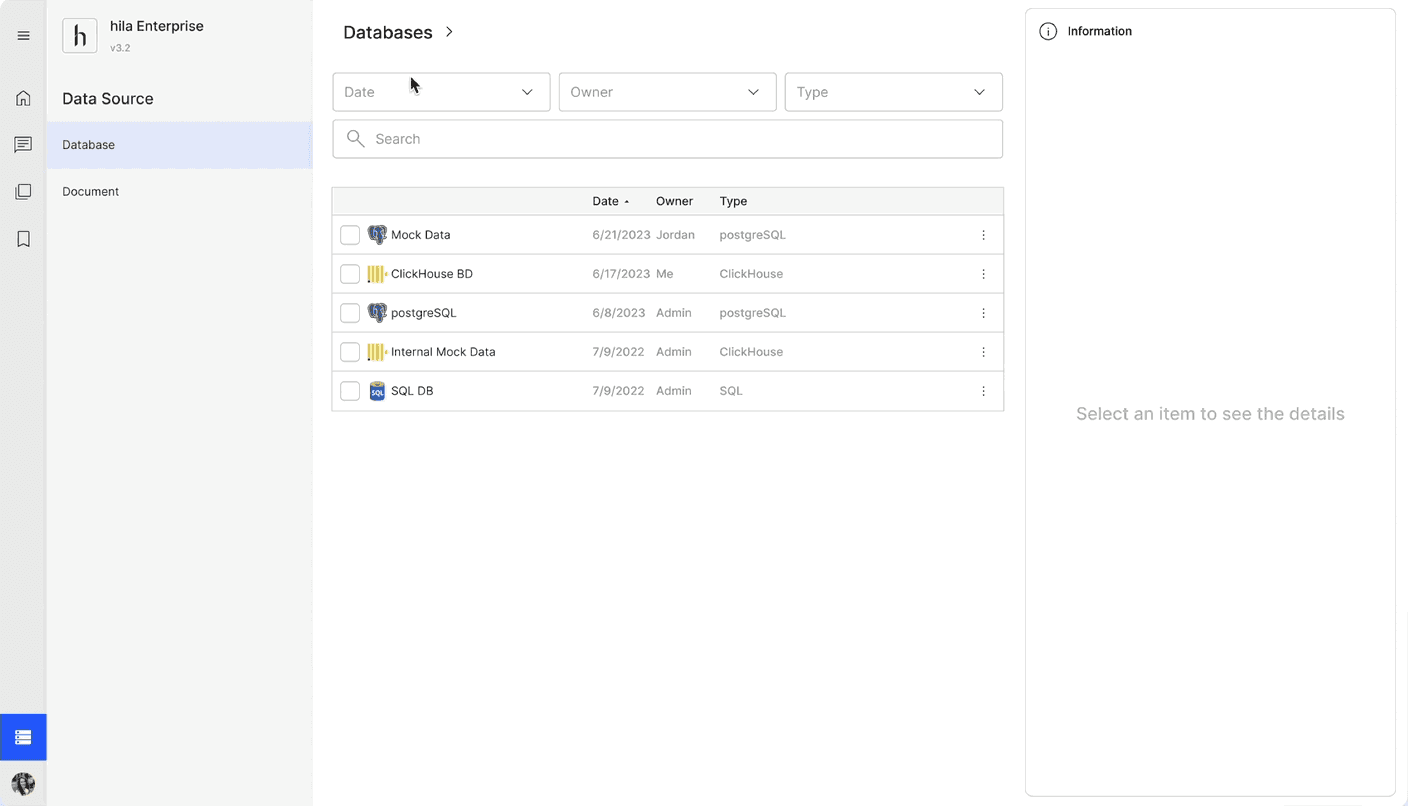
  • Filter by date, owner, and type.

  • Result auto-updated.

After: Sort by date, owner, and type

  • By default, files are listed from newest to oldest, but clicking the Date column header reverses the order.

  • Users can also sort by Owner, organizing files in the alphabetical sequence of the owner's name.

  • They can also sort by type.

After: Search with scope

  • The search function applies to within or beyond the current level, along with their locations.

  • Users can click a location link to directly navigate to that folder.

Solution 4

Hard to select without keyboards → Use checkbox

Currently, users need to press Shift on keyboard to select multiple files. However, 25% of the users prefer to use touchpad, and it is hard for them to select multiple files.

Currently, users need to press Shift on keyboard to select multiple files. However, 25% of the users prefer to use touchpad, and it is hard for them to select multiple files.

Currently, users need to press Shift on keyboard to select multiple files. However, 25% of the users prefer to use touchpad, and it is hard for them to select multiple files.

Therefore, we need to design a new selecting method to allow users convinently select without keyboards.

Therefore, we need to design a new selecting method to allow users convinently select without keyboards.

Therefore, we need to design a new selecting method to allow users convinently select without keyboards.

  • introduced a checkbox selection system.

  • Users can do multi-selection simply with the checkbox in-front of the file.

  • Users can deselect multiple files using the tool bar at the top.

Solution 5

Redesign the unintuitive file uploading experience

Before: Unintuitive uploading experience
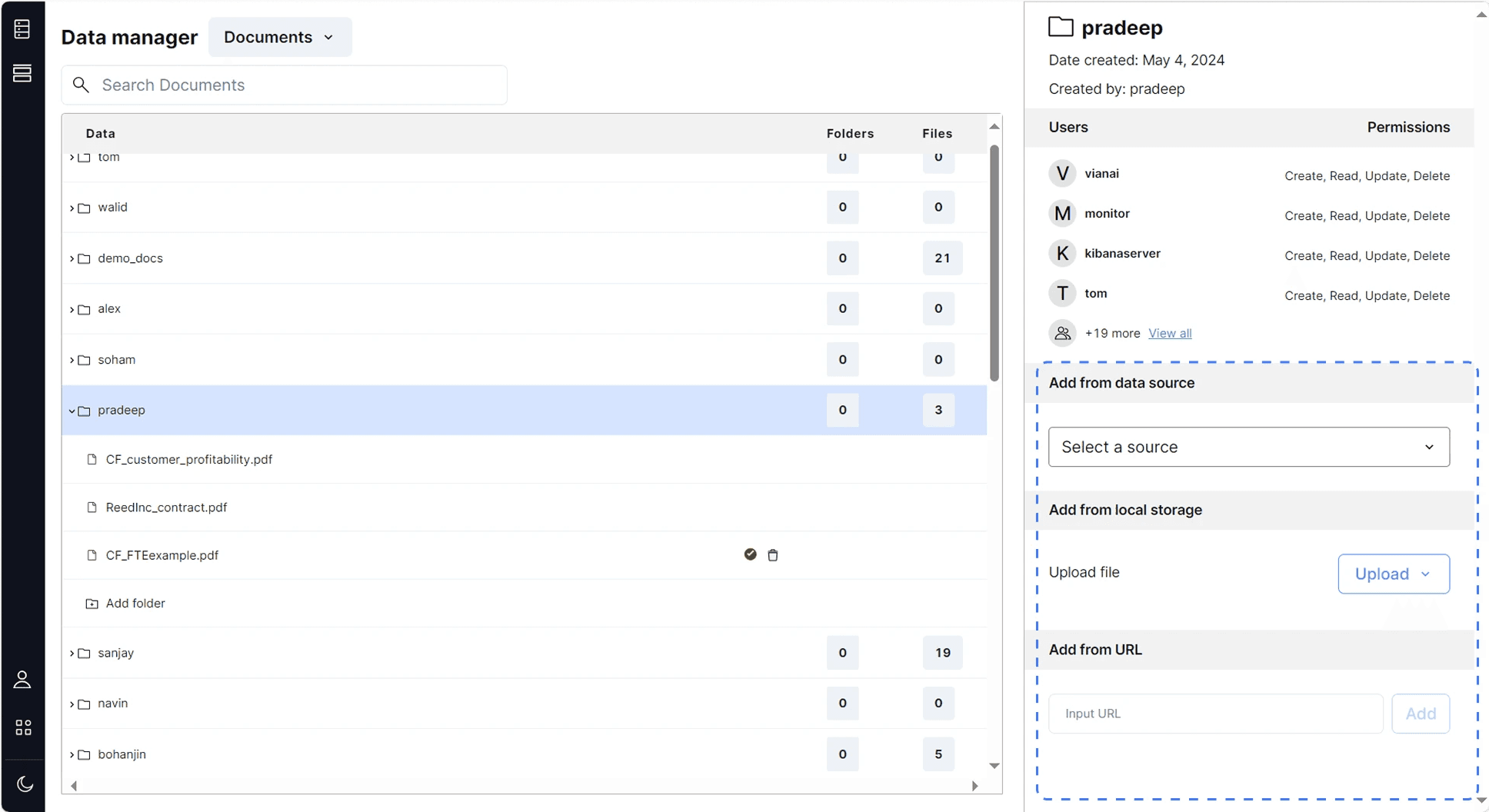
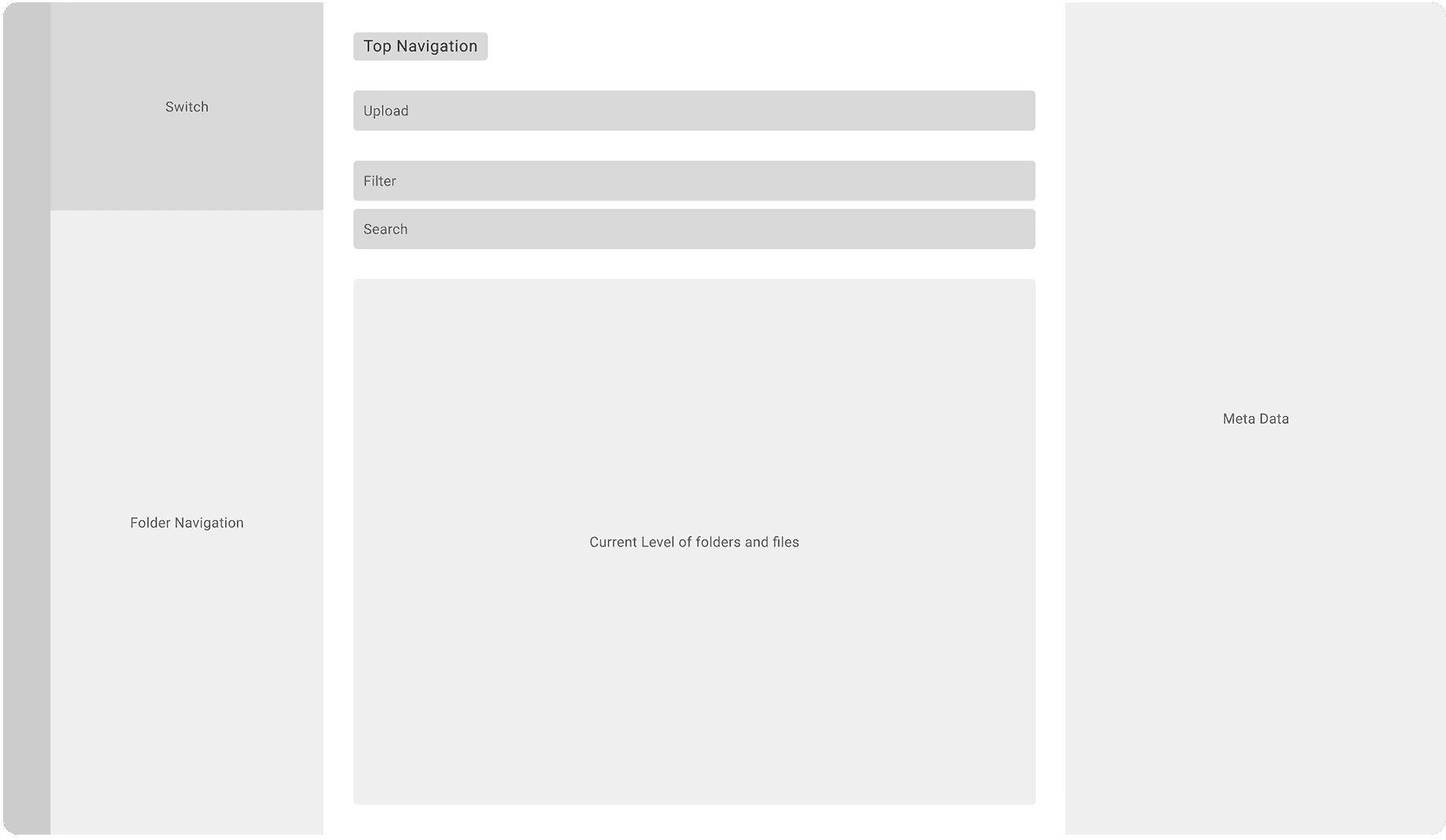
  • located in the bottom-right corner, occupying the same space as the meta data section. Interferencing the already information-heavied meta data section.

  • No indication of upload progress.

  • Upload interface is inconsistent with what users are used to.

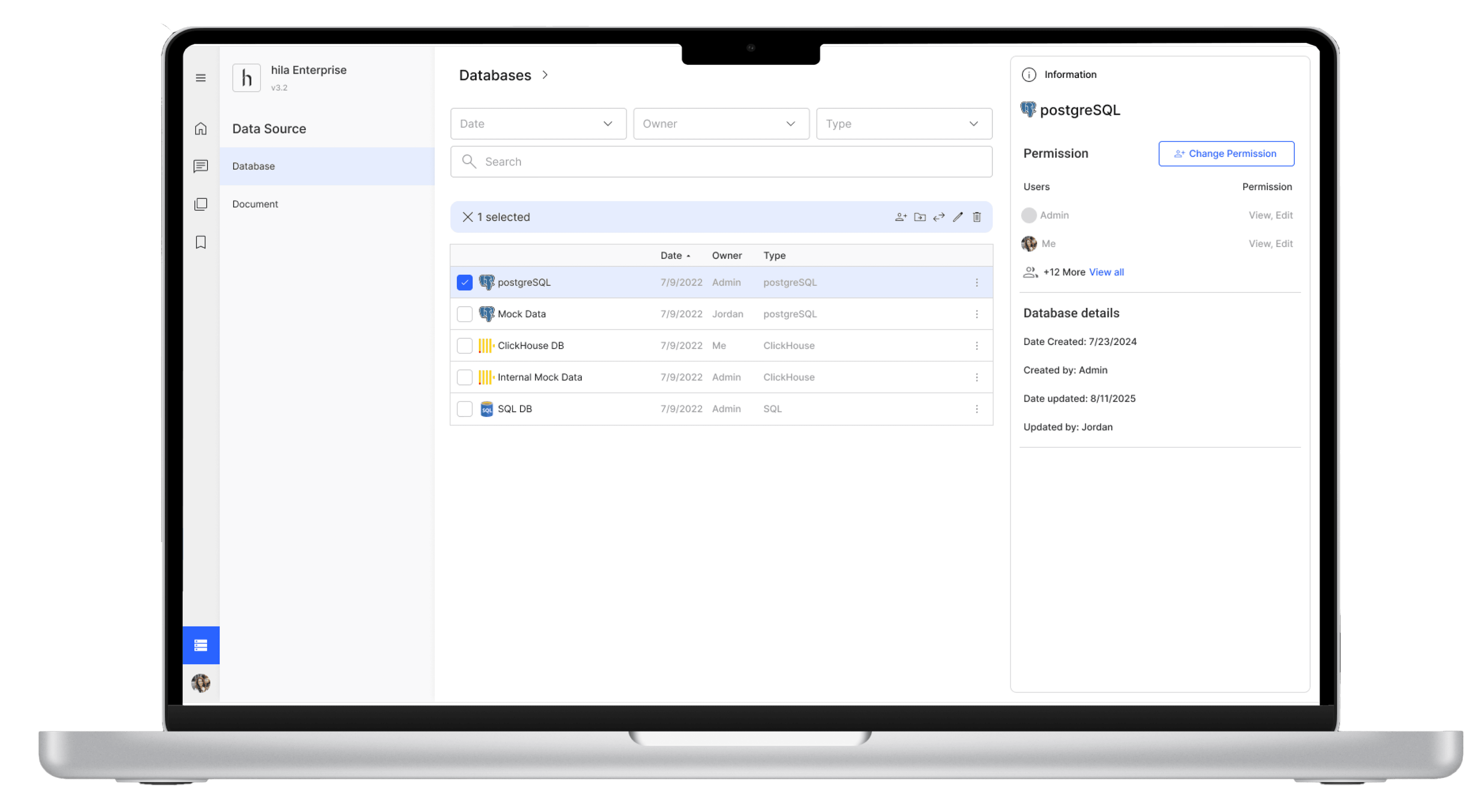
After: Redesign the uploading experience

  • Move uploading section below the top navigation

  • Add progress indicator

  • Align the upload interface with what users are used to.

Result

Increase Usage and Improve User Experience

Usage rate increase from

54%

to

72%

During 2 client feedbacks session,

Clients report that it's easier to upload and organize 2000+ files
Reflection

How to improve Human-AI Interaction given the nuance of human languages and avoid AI’s hallucinations?

This 15-week internship provided valuable hands-on experience in designing for generative AI. It was inspiring to see how hila Enterprise tackles the challenge of AI hallucination by empowering users to select data sources for generating answers.


The internship deepened my understanding of how AI queries data sources and the formats in which these sources are processed. More importantly, I realized that AI often struggles to grasp the nuances of human language, which can lead to inaccurate responses. As designers, we can address this challenge by creating better systems that guide users to ask more precise questions. This insight has motivated me to further explore the field of AI design and human-AI interaction.

Additionally, the internship offered valuable exposure to how industries collaborate and operate. I worked closely with design, engineering, and project management teams, gaining a clear understanding of their respective roles and how to foster effective collaboration. This experience taught me how to ensure seamless coordination across teams, a critical skill in any professional setting.

This 15-week internship provided valuable hands-on experience in designing for generative AI. It was inspiring to see how hila Enterprise tackles the challenge of AI hallucination by empowering users to select data sources for generating answers.


The internship deepened my understanding of how AI queries data sources and the formats in which these sources are processed. More importantly, I realized that AI often struggles to grasp the nuances of human language, which can lead to inaccurate responses. As designers, we can address this challenge by creating better systems that guide users to ask more precise questions. This insight has motivated me to further explore the field of AI design and human-AI interaction.

Additionally, the internship offered valuable exposure to how industries collaborate and operate. I worked closely with design, engineering, and project management teams, gaining a clear understanding of their respective roles and how to foster effective collaboration. This experience taught me how to ensure seamless coordination across teams, a critical skill in any professional setting.

This 15-week internship provided valuable hands-on experience in designing for generative AI. It was inspiring to see how hila Enterprise tackles the challenge of AI hallucination by empowering users to select data sources for generating answers.


The internship deepened my understanding of how AI queries data sources and the formats in which these sources are processed. More importantly, I realized that AI often struggles to grasp the nuances of human language, which can lead to inaccurate responses. As designers, we can address this challenge by creating better systems that guide users to ask more precise questions. This insight has motivated me to further explore the field of AI design and human-AI interaction.


Additionally, the internship offered valuable exposure to how industries collaborate and operate. I worked closely with design, engineering, and project management teams, gaining a clear understanding of their respective roles and how to foster effective collaboration. This experience taught me how to ensure seamless coordination across teams, a critical skill in any professional setting.

This 15-week internship provided valuable hands-on experience in designing for generative AI. It was inspiring to see how hila Enterprise tackles the challenge of AI hallucination by empowering users to select data sources for generating answers.


The internship deepened my understanding of how AI queries data sources and the formats in which these sources are processed. More importantly, I realized that AI often struggles to grasp the nuances of human language, which can lead to inaccurate responses. As designers, we can address this challenge by creating better systems that guide users to ask more precise questions. This insight has motivated me to further explore the field of AI design and human-AI interaction.

Additionally, the internship offered valuable exposure to how industries collaborate and operate. I worked closely with design, engineering, and project management teams, gaining a clear understanding of their respective roles and how to foster effective collaboration. This experience taught me how to ensure seamless coordination across teams, a critical skill in any professional setting.

This 15-week internship provided valuable hands-on experience in designing for generative AI. It was inspiring to see how hila Enterprise tackles the challenge of AI hallucination by empowering users to select data sources for generating answers.


The internship deepened my understanding of how AI queries data sources and the formats in which these sources are processed. More importantly, I realized that AI often struggles to grasp the nuances of human language, which can lead to inaccurate responses. As designers, we can address this challenge by creating better systems that guide users to ask more precise questions. This insight has motivated me to further explore the field of AI design and human-AI interaction.

Additionally, the internship offered valuable exposure to how industries collaborate and operate. I worked closely with design, engineering, and project management teams, gaining a clear understanding of their respective roles and how to foster effective collaboration. This experience taught me how to ensure seamless coordination across teams, a critical skill in any professional setting.

Side Projects

Icon System Update + Animated Logo Design

Icon System Update + Animated Logo

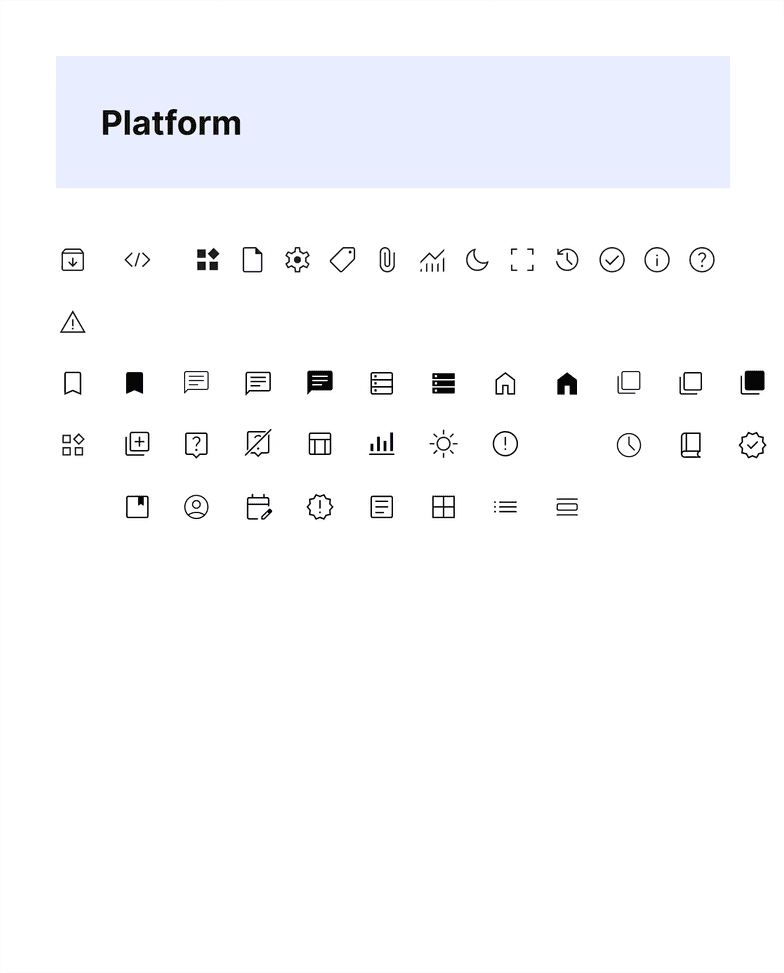
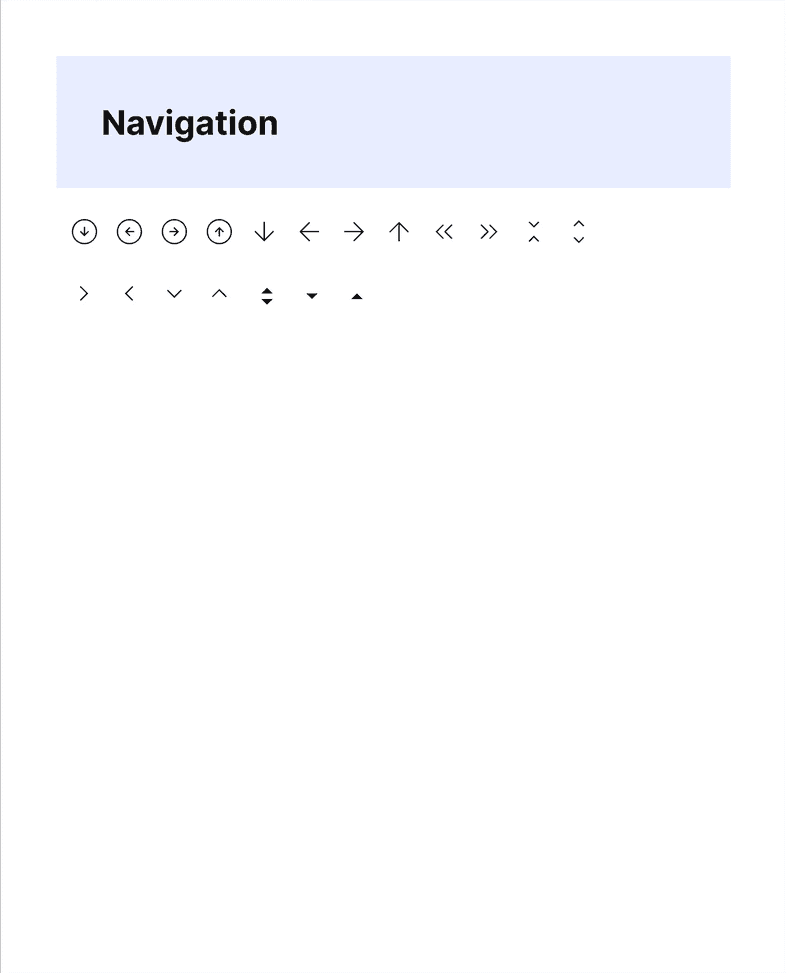
Icon System Update

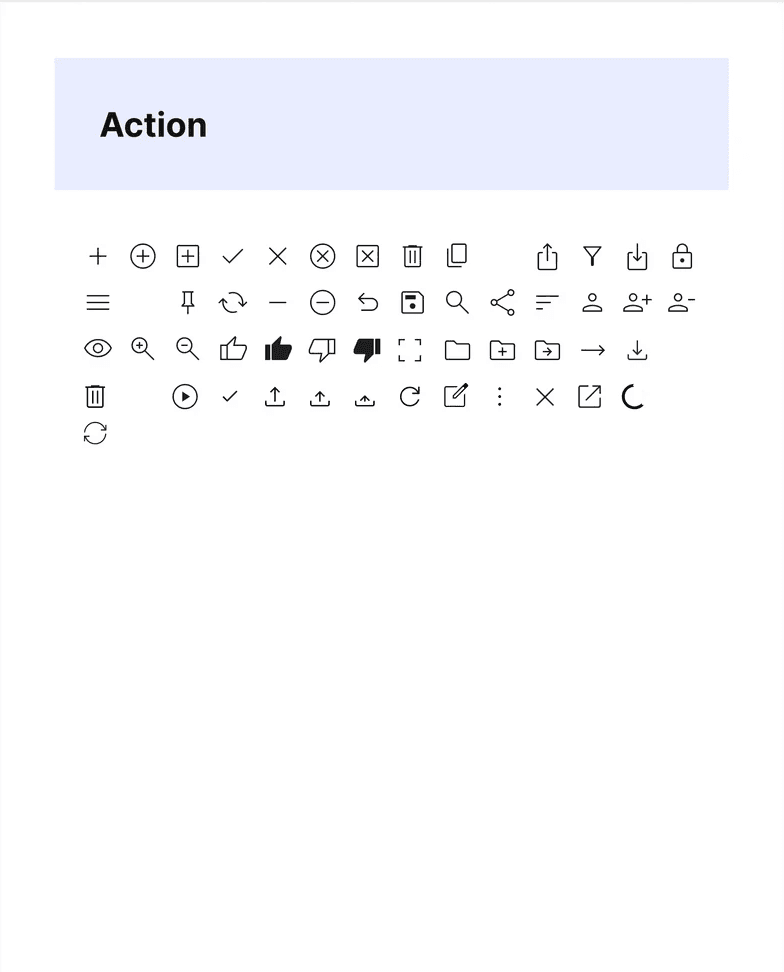
I updated Hila Enterprise's icon system to align with the "Material Symbols" toolkit. The update allows the design team to expand it efficiently by selecting icons instead of designing from scratch, thus increasing the overall efficiency of icon design and use. The updated system is now widely used across the company.

I updated Hila Enterprise's icon system to align with the "Material Symbols" toolkit. The update allows the design team to expand it efficiently by selecting icons instead of designing from scratch, thus increasing the overall efficiency of icon design and use. The updated system is now widely used across the company.

I updated Hila Enterprise's icon system to align with the "Material Symbols" toolkit. The update allows the design team to expand it efficiently by selecting icons instead of designing from scratch, thus increasing the overall efficiency of icon design and use. The updated system is now widely used across the company.

Animated Logo Design

I designed the animated logo for the conversation page to indicate answer generation, guiding users to wait and avoid premature actions.


The logo also reinforces Hila Enterprise’s branding. I explored two design concepts: one inspired by a star, symbolizing creativity and generativity, and another by a cube, emphasizing rationality and anti-hallucination. After over 40 iterations, I finalized a design that conveys mechanism, rationality, and anti-hallucination.

I designed the animated logo for the conversation page to indicate answer generation, guiding users to wait and avoid premature actions.


The logo also reinforces Hila Enterprise’s branding. I explored two design concepts: one inspired by a star, symbolizing creativity and generativity, and another by a cube, emphasizing rationality and anti-hallucination. After over 40 iterations, I finalized a design that conveys mechanism, rationality, and anti-hallucination.

I designed the animated logo for the conversation page to indicate answer generation, guiding users to wait and avoid premature actions.


The logo also reinforces Hila Enterprise’s branding. I explored two design concepts: one inspired by a star, symbolizing creativity and generativity, and another by a cube, emphasizing rationality and anti-hallucination. After over 40 iterations, I finalized a design that conveys mechanism, rationality, and anti-hallucination.

Concept - Star

Rationality

Anti-hallucination

Concept - Cube

Creativity

Generativity

Selected Version

Cleaness

Mechanism

Animated logo with generation process